Call Logs
Call Logs provide detailed call records on demand. Maximize efficiency and optimize your overall calling strategies by carefully examining key info in your call log,

Thanks for reaching out!
We'll get back to you as soon as we can. In the meantime, feel free to explore more about Vonage and how we're making communications more flexible, intelligent, and personal so our customers can stay ahead.
What Are Call Logs?
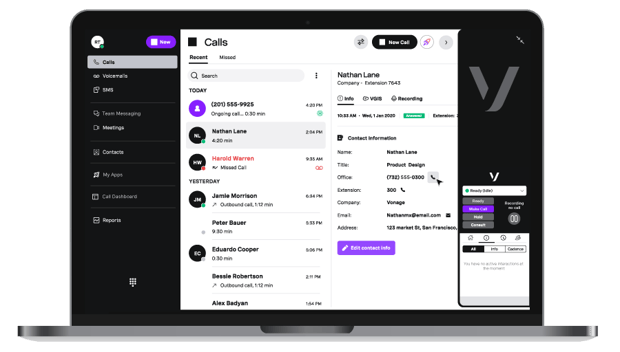
Call Logs, also referred to as Call Reports, allow access to detailed call records. They can be accessed according to extension, user, or account. Reports are intended to provide a comprehensive view of the information a company has about call activity.
Call Logs empower admins to select different reports based on the specific information they want, such as extension view, dialing activity, phone numbers called, and network and call quality. The reports can be generated daily, weekly or monthly; admins can also select a specific start and end date.
How to view your Call Log history
It’s easy to view and understand call logs using our reports. Just use the default time frames available in the drop-down menu, or set a custom start date and time and end date and time for your report query.
Then run the report, and either print the results, save them as a PDF, or export them as an Excel document. You can also apply filters to narrow down your results, e.g., inbound calls, and save that call log template.
Why Do Businesses Use Call Logs?
Information saved by logging phone calls reveals a wealth of vital information hidden in past conversations. Vonage Call Logs include general company call reports that give you an understanding of call activity across the entire account.
For example, you can track, measure, and compare activity for one or more users to improve employee performance. Call queue reports show things like missed or abandoned calls during certain periods of the days, allowing you to ensure you have adequate staffing. And you can also stay on top of network and call quality.

Advantages of using Call Logs
Vonage Call Logs provide reports containing information and details on different types of customer interactions, including calls, messaging, and meetings. With our call log program, you can view custom reports on call activity daily, weekly, or monthly by simply logging into your Admin Portal.
Data-rich — Admins can use call records to view who the call was to and/or from, how long the call lasted, the time of the call, call disposition (whether it was answered, sent to voicemail, blocked, etc.), call volumes, whether the call was inbound or outbound, and more. End users can access their own call history in their desktop and mobile app.
Economical — Check additional rates for international calling, and ensure your phones are used appropriately.
Scalable — Use call log analytics to make executive decisions, like when to increase or decrease staff or whether to update your IVR with new options.
Still have questions about VBC Call Logs?
Yes, end users have access to their call histories on their Desktop and Mobile Apps.
The Vonage Admin Portal provides an account-wide view of all of the pertinent details and call activity for the admin’s account. Admins can generate reports — daily, weekly, monthly, or for a specific date range — based on what kind of information they want, such as extension view, dialing activity, phone numbers called, network and call quality, call queues to make sure they have enough staffing, and missed or abandoned calls during certain periods of the day. They can also look at information about specific users.
A call log app is a tool that records and manages your phone call history, providing details such as the date, time, duration, and contact information for each call.
The security of call log apps varies by provider. It's essential to choose reputable apps that offer encryption and data protection features to safeguard your call history.
Call logs are crucial as they provide a record of incoming and outgoing calls, ensuring accountability and facilitating follow-up actions. They enhance customer service by monitoring interactions and can clarify disputes. Call logs can also be integrated with CRM systems, improving communication management and strengthening customer relationships.
Call logs have various practical use cases, including tracking customer inquiries in support to enhance satisfaction, monitoring sales interactions for timely follow-ups, and analyzing call patterns for better staffing. They can also be used for training agents by reviewing conversations, resolving disputes by verifying details, measuring marketing campaign effectiveness, maintaining client records for personalized communications, and ensuring compliance with regulations requiring documentation.
How to find a deleted call log may vary depending on your phone provider and the call log app that you’re using, but we’ll talk you through how to do it with Vonage.
Log into your Vonage account: Visit the Vonage website and sign in.
Access call history: Go to your account dashboard and click on “Call History”.
View past call logs: Your call logs will appear on the Call History page. You’ll be able to filter your calls by date or type to help you find specific logs.
Download or export: You can download or export the call log data in your preferred format.